How Message Personalization Works for Couples
How Message Personalization Works for Couples
Message personalization works by taking a few private details about your partner — a nickname, an anniversary, a shared memory — and slotting them into a smart template that sends at exactly the right moment. The result reads like a note you wrote yourself, not a scheduled text. Pingher is built around this exact mechanic: one-tap scheduling, AI-suggested wording, and date tracking so couples can maintain daily emotional intimacy without carving out time to write from scratch every morning.
Table of Contents
- Why personalization makes your partner feel truly understood
- The core building blocks: data, templates, and timing
- Ready-to-use message templates for couples
- How apps automate personalization so messages feel natural
- Privacy and consent for U.S. couples using personalized messaging
- Dos and don’ts: frequency, specificity, and common mistakes
- How to start sending personalized messages in 15–30 minutes
- How Pingher handles personalization for couples
- Key Takeaways
- Why this matters more than most couples realize
- Pingher keeps the connection going without the daily effort
- Useful sources
Why personalization makes your partner feel truly understood
The psychological driver is simple: a message that references something specific to your relationship signals I was thinking about you specifically, not just I sent a text. That felt sense of being understood is what separates a meaningful touchpoint from a notification.
The data backs this up. Personalized messages make 57% of customers less likely to unsubscribe, and 79% of consumers more likely to stay loyal when they receive personalized experiences. SMS open rates can reach up to 98%, meaning a well-timed morning message almost certainly gets read. McKinsey research shows that top personalization performers generate roughly 40% more revenue from personalization activities — a commercial signal that translates directly to relationship engagement: relevance drives response.
| Metric | Finding |
|---|---|
| Loyalty lift | 79% more likely to stay loyal with personalized experiences |
| Unsubscribe reduction | 57% less likely to disengage from personalized messages |
| Revenue premium | ~40% more from top personalization performers (McKinsey) |
There’s also a flywheel at work. Relevant messages get read and responded to. Responses give you richer data about what resonates. Better data produces more precise personalization. Over time, a simple “good morning” template evolves into something that genuinely reflects how your relationship communicates — without extra effort on your part.
The core building blocks: data, templates, and timing
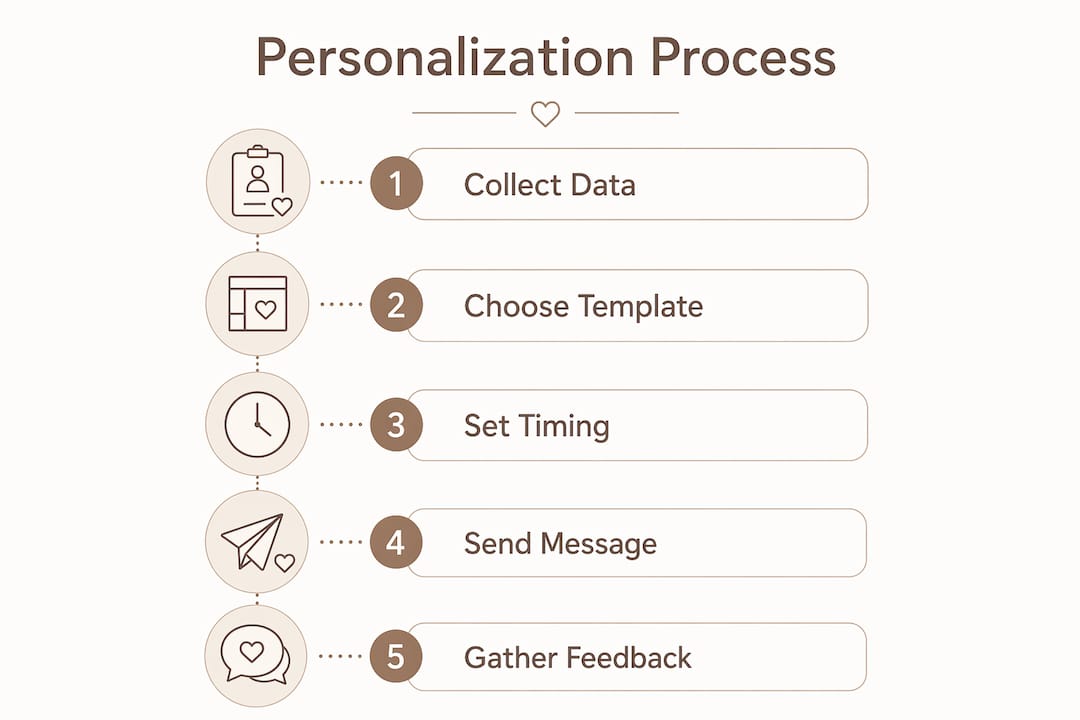
Personalization needs three things: personal data, a template that accepts variables, and a timing rule that decides when to send.
Personal data is the raw material. For couples, this means:
- Partner’s name and nickname (e.g., “Babe,” “Mi amor”)
- Key dates: anniversary, first date, birthday
- Shared memories or inside references (“that rainy weekend in Portland”)
- Preferences: morning person vs. night owl, favorite coffee order, love language
Templates with merge tokens are the engine. A master message like “Good morning, {{partner_nick}} — three years ago today we had that terrible first date that turned perfect. Still my favorite story.” becomes a fully personal note at send time. Fallback text matters here: if a field is empty, a good system substitutes a sensible default rather than surfacing a blank token like “Good morning, .”
Timing triggers are what make messages feel context-aware rather than random. A trigger set to fire three days before your anniversary, or at 7:30 AM on weekdays when your partner checks their phone, lands differently than a message sent at noon on a Tuesday for no reason. Behavioral triggers consistently outperform demographic-only personalization because they connect the message to a moment.
One practical constraint: SMS caps at 160 characters per segment. Keep templates tight, and save longer notes for MMS or in-app messaging.
Ready-to-use message templates for couples
The highest-impact message types are event-based reminders, micro-affirmations, check-ins, and memory prompts. Here are eight copy-ready examples grouped by type.
Anniversary / event reminders
- "One week until our anniversary. Still can’t believe you said yes. "
- “Three years ago today. Best decision I ever made.”
Morning micro-affirmations
- “Good morning, {{partner_nick}}. Hope today’s easier than yesterday. I’m rooting for you.”
- “Thinking of you before the day gets loud. You’ve got this.”
Post-work check-ins
- “How’d the big meeting go? Tell me everything tonight.”
- “Saving the couch cushion next to me. Home soon?”
Memory prompts
- “Remember that hike where we got completely lost? I’d do it again tomorrow.”
- “Still think about that dinner in Charleston. We need to go back.”
Pro Tip: The templates that feel most natural are the ones where the personalization is invisible. Swap in a specific place name or a real shared detail instead of a generic token. “That hike in Sedona” lands harder than “our last trip together.”
For tone consistency, pick one register for a full week — playful or tender, not both. Mixed signals across a week of messages create a slightly off-kilter effect, even if each individual message is good.
How apps automate personalization so messages feel natural
Platforms combine merge tags, behavioral triggers, and AI-driven timing to produce individualized messages without manual effort each day. Here’s what happens behind the scenes:
- Merge tags swap variable fields at send time, so one template serves every occasion without rewriting
- Conditional content blocks let the app show different wording based on a tag (e.g., “anniversary week” vs. standard week)
- Send-time optimization uses AI to identify when your partner is most likely to read a message and schedules delivery accordingly
- Fallback defaults prevent blank tokens from appearing if a field wasn’t filled in
- Preview and test-send lets you read the final rendered message before it goes live
For couples, the one-tap workflow matters most: choose a template, confirm the merge fields, set a schedule, and the app handles the rest. No daily decision fatigue.
Privacy and consent for U.S. couples using personalized messaging
Store only what you need. A first name, a nickname, and two or three key dates are enough to produce genuinely personal messages. Collecting more than that creates unnecessary exposure if a device is lost or an account is compromised.
A few practical rules for U.S. users:
- Explicit consent first. Both partners should know which personal details are stored and agree to their use.
- Local vs. cloud storage. Understand whether the app stores data on-device or in the cloud, and check the privacy policy before entering sensitive details.
- Device lock. A passcode or biometric lock on the device where the app lives is the simplest protection.
- Edit and delete access. The app should let either partner update or remove stored fields at any time.
- Never send sensitive data over SMS. Financial details, passwords, or medical information don’t belong in a scheduled text message.
Consent isn’t a one-time checkbox. Revisit stored fields occasionally, especially after a relationship milestone changes what feels appropriate to reference.
Dos and don’ts: frequency, specificity, and common mistakes
Do:
- Use concrete details — a place name, a nickname, a specific date
- Set a sensible frequency (daily is fine; multiple times a day tips into noise)
- Preview every message before scheduling to catch awkward token rendering
- Vary templates week to week so messages don’t feel repetitive
Don’t:
- Reference sensitive facts (health issues, financial stress) in scheduled messages
- Let merge errors repeat without fixing the underlying field
- Send the same template on the same day every week — it starts to feel automated even when the content is warm
- Ignore your partner’s feedback about tone or timing
Pro Tip: Before launching a sequence, send a 3-day trial to yourself. Read each message aloud. If it sounds like a form letter, the template needs a more specific detail swapped in.
Keeping scheduled messages feeling spontaneous is mostly about specificity. A message that references something real and recent will always outperform a generic affirmation, no matter how warmly it’s worded.
How to start sending personalized messages in 15–30 minutes
You can go from zero to a running 7-day sequence in about half an hour by following these steps:
- Pick one message type. Morning micro-affirmation is the easiest starting point.
- Add three fields. Partner’s nickname, one shared memory or place name, and their best time of day to receive a message.
- Choose a template and set fallback text. If the nickname field is empty, the fallback should be something natural (“you”) rather than blank.
- Schedule and test-send. Send the rendered message to yourself first and read it as your partner would.
- Set frequency limits. One message per day is the sweet spot for most couples.
- Tune after the first week. Ask for honest feedback on tone and timing, then adjust one variable at a time.
On pricing: most apps in this category offer a free tier covering basic templates and a limited number of scheduled messages. A paid subscription (monthly or annual) typically unlocks AI wording suggestions, send-time optimization, and a larger template library. Expect the free tier to be enough for a first test sequence; upgrade when you want the AI layer and more scheduling flexibility.
How Pingher handles personalization for couples
Pingher maps directly to the mechanics above. The app combines curated templates, merge tokens, date tracking, and one-tap scheduling so messages read naturally and require almost no daily maintenance.
Key features relevant to couples:
- AI wording suggestions that match tone (playful, tender, thoughtful) to the occasion
- Nickname and partner fields with fallback defaults so no message surfaces a blank token
- Anniversary and event trackers that trigger messages at the right moment without manual reminders
- Send-time optimization that learns when your partner is most likely to read
- Preview and test-send before any message goes live
Pingher is designed specifically for daily relationship habits — not one-off messages, but a consistent rhythm of small, specific touchpoints that add up over time. The free tier is enough to build one template and run a 7-day micro-affirmation test. That’s the recommended starting point: one template, one week, real feedback.
Key Takeaways
A small set of personal details plus smart templates plus timing rules produces messages that feel bespoke — and Pingher automates that entire process for couples in minutes.
| Point | Details |
|---|---|
| Psychology first | Personalization works because specific details create a felt sense of being understood, not just contacted. |
| Three core inputs | Every personalized message needs personal data, a merge-token template, and a timing trigger. |
| Setup time | A first personalized daily message takes 15–30 minutes to configure from scratch. |
| Privacy baseline | Store only the fields you need; both partners should consent to what’s saved and be able to delete it. |
| Start with Pingher | Use Pingher’s free tier to build one template and run a 7-day micro-affirmation test before upgrading. |
Why this matters more than most couples realize
Most relationship advice focuses on grand gestures. The research points somewhere quieter: consistent, specific, well-timed small messages do more for daily intimacy than occasional big ones. Personalization is what makes those small messages land. A generic “thinking of you” is easy to scroll past. A message that references the exact coffee shop where you had your third date is not.
The technical mechanics covered here — merge tokens, behavioral triggers, fallback text, send-time optimization — exist precisely to make that specificity effortless. The goal isn’t automation for its own sake. It’s removing the friction between wanting to show up for your partner every day and actually doing it.
Pingher keeps the connection going without the daily effort
Daily emotional intimacy doesn’t require daily inspiration. Pingher gives couples a smarter path: build a template once, add the details that matter to your relationship, and let the app handle the timing and delivery.
The free tier covers everything you need to test the concept: one template, a 7-day schedule, and a preview before anything sends. Pingher+ unlocks AI suggestions, send-time optimization, and a full template library for couples who want more variety and less repetition. No long-term commitment required to start.
Try the free tier at Pingher and send your first personalized message today.
Useful sources
- Customized SMS: how to personalize text messages at scale — Sinch guide covering merge tags, behavioral triggers, MMS, and AI optimization for personalized messaging.
- The value of getting personalization right — McKinsey — Research on revenue impact and consumer expectations around personalization.
- Role of personalized messaging in customer retention — Krispcall — Data on SMS open rates, loyalty lifts, and unsubscribe reduction from personalized messages.
- Email personalization beyond “Dear [Name]” — Funnel.io — Practical guidance on making personalization invisible and natural.
- Fallbacks and merge fields — Klaviyo — Technical explanation of fallback text and how to prevent blank token errors.
- Email personalization tactics — Monday.com — Overview of AI-driven send-time optimization and dynamic content blocks.
- Template love messages with a personal touch — Pingher blog — Practical templates and personalization approaches for couples.
- How personalized love tools work for couples — Pingher blog — Technical walkthrough of automation and platform mechanics for relationship messaging.
- Send thoughtful messages on autopilot — Pingher blog — First-week testing tips and autopilot workflow guidance for busy couples.
Recommended
Built for couples who care.
Pingher helps you send the right words at the right moment.
Get Pingher on Google Play